• Home
  • Articles
  • Entertainment
  • Games
  • Hardware
  • Projects
    • CheerLights
    • Coffee and Tea
    • iPhone
    • MyToaster
    • ThingSpeak
    • TouchShield Slide
  • Security
  • Software
  • Space
  • Talks
  • Tweaks
  • Updates

I am ShadowLord

Interesting to me

    
  • Keynote Speech at Web of Things 2011

    Jun 1st 2011

    No comments

    I had the distinct  privilege to be invited to give a keynote speech at the Web of Things Workshop 2011 at Pervasive 2011 in San Francisco on June 12, 2011.

    The perspective of my presentation will be from my vantage point of being involved day-to-day working on Internet of Things projects with ioBridge and how we turned projects into products for consumers and manufacturers. Our perspective is that we see the Internet of Things being built from the ground up versus the top down. This means that there is so much innovation that will bubble up from small companies that will revolutionize the industries above them. I am honored to be part of the Web of Things Workshop.

    Updates:

    The Web of Things conference turned out great. I got a chance to meet the researchers and developers in other areas related to the Internet of Things and the cross over into wireless, social networking, and web technologies.

    Here are the slides from my keynote presentation at the Web of Things Workshop.


    Share this

    Talks

    internet of things, iobridge, thingspeak, web of things

  • ThingSpeak: Building My Own Twitter (for Things)

    Feb 19th 2011

    8 comments

    Over the past several months I have been working on software to allow “things” to form social networks and send status updates via the Internet. At first glance this may sound very impractical. Hopefully, in a few years this will make more sense as better applications come out. Remember how ridiculous my toaster sounded three years ago? I gave that thing a voice and since has been on TV and more people are interested in it than my Twitter status updates. More proof? At CES 2011 there were at least 10 appliances that could send Twitter status updates. I am not saying that I created them, but I am not not saying that they didn’t know about My  Toaster and it’s 600+ followers on Twitter. With this project, I wanted to take it a few steps further and build something from the ground up that’s focused on collecting enormous amounts of data from everyday objects, allowing devices to interact with each other, and building applications to present some meaning. The ThingSpeak project is finally ready to go and open to anyone that wants to start building applications.

    My Problem

    One problem with the Internet of Things is the concept of “the killer app” – the app that defines a new industry. The internet connected refrigerator is our poster child. Recently, Ryan Rusnak connected a mini fridge to the iPhone via ioBridge, added a motor controlled beer selector, and strapped on an air cannon to fire beers to his couch from 25 feet away – now that’s a killer app. So, my problem was trying to find an application that highlights key features of ThingSpeak and why it’s different.

    My App

    What I come up with is the idea of “my_house”. “my_house” is a collection of “rooms” that all hold computers, appliances, and sensors aka things. I recently installed some light sensors in “my_room” that push light levels to the ThingSpeak API. I did this to remind me when to turn my lights on so I don’t work in the dark when I get plugged in. And an interesting side benefit was that now I can detect whether or not someone is in the room based on the light level. I will admit this could have been done other ways, but sometimes you solve problems with what you have lying around. “my_house” already keeps track of my location using Google Latitude to control my thermostat. Eureka moment…

    Now I can tell when my mom goes into my room when I am out on the town, most likely Sheetz!!!

    Below is a screenshot of the demo app and how I aggregate the data collected by my light sensors. Here are a few things I want to point out:

    • “my_house” is sending the status updates via a collection of networked sensors
    • The status updates were generated by the light sensor device itself
    • The timestamps were recorded by the ThingSpeak API
    • If you click the chart icon you get what the actual light level was
    • The app works in real-time and you can check it out here

    "Twitter of Things" ThingSpeak Demo App


    The Technical Details

    The light sensor uses a Netduino Plus that connects to my home network over Ethernet. This device uses Microsoft .NET Micro Framework and I wrote an application that interfaces with the ThingSpeak API. I also wrote a tutorial over at the ThingSpeak community site on how to use the Netduino Plus for those that want to get started with it fast.

    The front-end application is written using only HTML, CSS, and jQuery. I have the fully documented source code attached and you can also see the app live in your web browser.

    Project Files:

    • Netduino Plus .NET Project
    • Twitter of Things Demo App

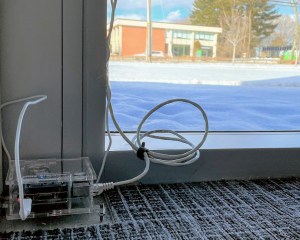
    Light Sensor connected to the Netduino Plus

    Share this

    ThingSpeak

    internet of things, iobridge, netduino, Projects, social networking, thingspeak, twitter, web of things

  • Web of Things Talk at Ignite Pittsburgh

    Feb 10th 2011

    2 comments

    I will be giving a talk at the first annual Ignite Pittsburgh a part of the O’Reilly Ignite Global week. Ignite is series of 5 minute talks on any topic – 20 slides at 15 seconds each. I will be giving a talk about the “Web of Things” aka “Internet of Things”. This is the future of connected devices and a new era of self-serving applications. This topic is near and dear to me as I have been connecting things together for a long time. It’s also the focus of ioBridge and some of the projects I work on. We used to kid about ioBridge being one step closer to SkyNet…it may actually be true given enough time, iterations, and scale. Who knows how many times civilizations have been to this point before?

    My talk is about the things that surround us – iPads, Toasters, Fridges, and Cars – and pose some questions – what if they were connected? What are the issues that we must consider? How can we can we disconnect in a connected world? After the talk I will post the slides and if they record it, I may or may not post the video.

    Web of Things Ignite Talk

    Ignite Pittsburgh

    Brillobox
    7pm
    Febuary 10, 2011

    Abstract and Credits

    Update:

    Ignite Pittsburgh

    Share this

    Talks

    internet of things, iobridge, my toaster, thingspeak, web of things

  • Automatic Thermostat Control Based on Location and Weather

    Sep 14th 2010

    23 comments

    The Pittsburgh Perl Workshop will be held at the Carnegie Mellon University on October 9-10, 2010. The PPW is a gathering of Perl programmers from around the world (and near Pittsburgh) to learn more and discuss the future of Perl.

    At this year’s PPW, I will be giving a talk called, “Connecting the Internet of Things with Perl” (visit pghpw.org for schedule info). I will also explain how to create an Internet of Things application using off-the-shelf Perl modules and web control technology by ioBridge.

    As you may or may not know, Perl is a really powerful programming language that enables everything from fast prototyping of web applications to large-scale software platforms. What makes the language unique is the library of modules available to you. If you get a great new idea for a web app, you can get started quickly and find modules that others have written. In some cases, it’s literally copy-and-paste.

    A big movement for the past few years is this concept of The Internet of Things. More things will be on the Internet than people in the next few years, so my talk is to highlight why Perl is still relevant after 20 years and needs to be apart of this emerging technology. Internet of Things applications involve connecting sensors and controllers to the web. Perl is perfect for parsing lots of data, pushing data into databases, and connecting services together, known as “mashups”.

    My Internet of Things project, written in Perl, allows your current location and home weather conditions to control your home heating and cooling system.

    Location Aware Home Automation using Google Latitude API and ioBridge API

    Location Aware Home Automation

    I call it,  ”Location Aware Home Automation”. You don’t have to do anything to control your HVAC/Thermostat, it all happens based on where you are. If you are home, the thermostat regulates the inside temperature as normal. When you leave, systems turn off or enter power saving modes. When you get near your home, the heating/cooling system kicks back on so you have a comfortable temperature by the time you get back home. In order to pull off all of this passive and automatic functionality, I have mashed up several APIs from Google Latitude, WeatherBug, and ioBridge.

    Using the API for Google Latitude, I track the location of my Android mobile phone. When I get near my home, I check the weather using Google Weather API, WeatherBug API, and my home temperature (via ioBridge) to see if I need to to use the air conditioner, the heater, or neither. If I do need to control the HVAC, I send the control commands using the ioBridge API that routes the commands to the IO-204 controller that’s hooked up to my thermostat.

    This application is really just a beginning. Right after I got everything working, I started having a flood of ideas. I can see some real power here.

    The How To Portion of the Show

    >> Google Latitude

    You have to enable Google Latitude on your mobile phone and get your Badge ID. This ID represents your position in the world, your latitude and longitude. Visit the Google Latitude API site for more information.

    Install the latest Geo::Google::Latitude Perl module from CPAN.org – this module completely abstracts the access to the Google Latitude API for you. All you have to do us pass your ID and the module returns the date, time, last known latitude and longitude (the values are in decimal degrees).

    use Geo::Google::Latitude;
    my $gl=Geo::Google::Latitude->new;
    my $id="7832225593622256926";
    my $badge=$gl->get($id);
    my ($lat2, $lon2) = $badge->point->latlon;

    >> Calculating how far you are away  from home

    You have to figure out how far you are from home, you do this by doing some math. Oh wait, there’s a Perl module for that. Install Geo::Distance and all you have to do is tell it what latitude and longitude to compare and it spits out the distance.

    use Geo::Distance;
    my $geo = new Geo::Distance;
    ### Home Location
    my $lon1 = "-79.76408";
    my $lat1 = "39.980342";
    ### Calculated Distance
    my $distance = $geo->distance( 'mile', $lon1, $lat1 =>; $lon2, $lat2 ); # Use 'meter' to calculate distance in meters

    >> Getting the Weather

    You can use a number of weather APIs to get weather data for your home location. All you need to know is where you live. The easiest to implement is Google Weather (Weather::Google), but the WeatherBug API has a lot more information you can use for other Internet of Things things you may do.

     use Weather::Google;
    my $gw = new Weather::Google(15401); # Zipcode
    my $current_outside = $gw->current->{temp_f}; #Use temp_c for Celsius

    >> Connect to ioBridge

    All you have to do to connect with ioBridge is to send command via the ioBridge Widget API. First you create the control widgets for your heating and cooling system. For mine, I can use relays. Others may need serial strings, which you can send as well. Once you have the widgets created, locate there widget ID’s and send them to the API.

    use LWP::Simple;
    my $Air_Conditioner_widgetID = "Gb2Q1FUKPmzZ"; ### Replace with your widget ID's
    my $Heater_widgetID = "9c3WEGHKemnzJ";
    my $Inside_Temp_widgetID = "D32SDghy98iOu";
    my $ioBridgeAPI = "";
    $ioBridgeAPI = "http://www.iobridge.com/widgets/static/id=" . $Inside_Temp_widgetID . "&value=1&format=text";
    my $current_inside = get($ioBridgeAPI);
    ### Test if the heater or the air condition should be turned on
    if ($current_outside >= 78 && $current_inside >= 72) {
    $ioBridgeAPI = "http://www.iobridge.com/widgets/static/id=" . $Air_Conditioner_widgetID . "&value=1&format=text";
    get($ioBridgeAPI);
    }
    elsif ($current_outside <= 60 && $current_inside <= 68 ) {
    $ioBridgeAPI = "http://www.iobridge.com/widgets/static/id=" . $Heater_widgetID . "&value=1&format=text";
    get("$ioBridgeAPI");
    }

    >> Putting it all together

    Once you have the entire built all you have to do is call the app periodically using CRON Linux or Task Scheduler on Windows. Here is a TXT file of the Perl application with all of the parts tied together, probably will be easier to read and understand.

    The hardware side uses the ioBridge IO-204 connected to the control lines of a thermostat or an HVAC control box. The lines switch at 12 volts, so I use relays trigger them. Other thermostats that I researched use serial lines which the IO-204 can tap into using RS-232.

    It may seem like a lot of work, but just think about what is happening. Feeds from Google Latitude and WeatherBug are being processed and passed to your home network via the Internet. All of this is happening without your direct interaction – your things are working for you. I hope that you can see that is a start of some pretty amazing applications of technologies that will advance over time. A lot has changed in the past year, I can’t image what comes next.

    If you get around to building a project like this, please drop me a line. I love this stuff.

    Share this

    Projects

    google, GPS, home automation, internet of things, iobridge, latitude, location, Perl, Projects

  • Toaster + Twitter = Internet of Things

    Jun 30th 2010

    3 comments

    Really?

    You might be hearing this new buzz-phrase, “Internet of Things” quite a bit lately. You might be wondering what it’s all about. Let me try to explain.

    A “thing” could be a lot of things, but it’s not people (and definitely not places). That leaves everything else. Now according to the Internet, there are 6,767,805,208 people on Earth and of those 6,767,805,208 people 1,802,330,457 have used the Internet. That’s (only) 26%. So, that means one out of four people do not know what Numa Numa is all about. This also means there are a lot more things than people. A thing could be a camera, mobile device, sensors, your air conditioner, a river, and even a toaster.

    The trick to the “Internet of Things” or the “Web of Things” will be providing connectivity to all of those things. Once we do, we will be able to gain access to a lot of information. The next challenge will be making that data useful in our everyday lives. We are just at the start of this, that’s why we are just starting to hear about it (with some help with IBM commercials).

    I have been fascinated by this concept since I first joined the Internet, back where GeoCities and L’Hotel Chat were the hip spots. For me the interest started off by controlling things over the web. Then, I started wondering what are my things doing. What temperature is it at my house? What’s going on with my freezer? Is it time to refill my humidor? How much power is my computer using?

    Over a year and half ago, I placed my toaster on Twitter (@mytoaster). Since then, my toaster starting using other social networks and discovered online dating all by itself. That is a weird thought, “What if things get smarter and smarter?” Things will eventually be able to socialize with other things. My (sentient) toaster might even find another compatible toaster using eHarmony.

    I am not saying that this is the best example of the Internet of Things, but what I am saying is that it’s a start. I believe in a future of connected things so strongly that I joined a start up company that enabled my toaster way back when I was more interesting than my things.

    For a good primer on the Internet of Things, check the recent article on Silicon.com called, “Cheat Sheet: The internet of things“. My toaster even gets a tongue-in-cheek reference. Actually there are lots of great sites that are covering the Internet of Things and making things happen in this emerging industry – Singularity Hub, ReadWriteWeb, Wired.com to name a few.

    My guess is that you will hear more and more about The Internet of Things until it hits Smart Grid proportions, then you will hear about the next big thing – the smart internet of things grid perhaps.

    Share this

    MyToaster

    dating, internet of things, iobridge, my toaster, social networking, twitter

    • <
    • 1
    • 2
    • 3
    • >
  • Recent

    • MyToaster: 10 Best Inanimate Objects on Twitter
    • A Kickstarter Christmas: Going Cardboard — a documentary about board games
    • Las 10 cuentas de Twitter más divertidas y absurdas
    • CheerLights: my lights are linked to everyone else’s
    • Greencastle Movie Stills
    • Internet of Things DCWEEK Workshop during DCWEEK
    • Greencastle, Independent Film on Kickstarter
    • EL Pumpkin is Spanish for Electroluminescent Pumpkin
    • Internet of Things Talk at Carnegie Mellon University
    • Thank You, Steve Jobs
  • Tags

    airport arduino cards comedy writing dating Dominion games google Greencastle hack halloween internet of things iobridge IT lan liquidware movies my toaster optimization packet analysis Perl printer drivers printing procedure Projects psychology pumpkin recieve-only reviews services sniffing social networking SparkFun steampunk tech support tessco thingspeak twitter ubernote web 2.0 web applications web of things windows windows vista wireshark
  • Archives

    • March 2012 (1)
    • February 2012 (1)
    • January 2012 (1)
    • December 2011 (1)
    • November 2011 (3)
    • October 2011 (3)
    • September 2011 (1)
    • June 2011 (1)
    • February 2011 (2)
    • September 2010 (4)
    • July 2010 (2)
    • June 2010 (2)
    • May 2010 (1)
    • April 2010 (2)
    • March 2010 (3)
    • February 2010 (1)
    • December 2009 (1)
    • October 2009 (2)
    • September 2009 (1)
    • August 2009 (1)
    • June 2009 (2)
    • May 2009 (1)
    • April 2009 (1)
    • January 2009 (1)
    • December 2008 (3)
    • October 2008 (1)
    • June 2008 (1)
    • May 2008 (1)
    • April 2008 (1)
    • December 2007 (2)
    • November 2007 (1)
    • October 2007 (1)
    • September 2007 (1)
    • July 2007 (1)
    • June 2007 (1)
    • May 2007 (1)
  • Latest Tweets

© Copyright I am ShadowLord. All rights reserved.

Theme designed by Nischal Maniar